
How Many Visitors Does a Website Get and How Can You Activate Those Sessions for Higher Conversions?

A website can attract 15,000 visitors a month and still leave a marketing team wondering where the revenue is coming from.
Another site can attract fewer visitors and generate more leads, purchases, or signups because a larger share of sessions contain useful buying signals.
So, how many visitors should a website get?
There is no universal number. A Similarweb benchmark based on a HubSpot survey of more than 400 web traffic analysts found 46% of sites received 1,001 to 15,000 monthly visitors. Another 19.3% received 15,001 to 50,000, and 23.2% received 50,001 to 250,000.
Those figures give you context, not a traffic target. A better starting point is your own conversion goal, followed by a closer look at which sessions carry commercial intent.
Here’s how to evaluate your traffic, spot higher-value sessions, and turn relevant visitor activity into an onsite response.
How Many Visitors Does a Website Get?
Website traffic varies widely by industry, business model, audience size, acquisition strategy, and content volume.
A media company publishing hundreds of articles every week can generate millions of visits. A B2B SaaS company selling a specialized product to a narrow audience may have far fewer sessions and still generate substantial pipeline.
Similarweb also shows how wide the range can be. Only 0.5% of surveyed sites reported more than 10 million monthly visitors, so enormous traffic volumes are far from the norm.
The useful comparison comes from businesses with similar audiences and commercial models.
One caveat before you compare anything: check what your analytics counts. GA4 counts sessions, which reset after 30 minutes of inactivity and at midnight. Similarweb estimates visits from panel and clickstream data. Server logs count requests, bots included. Three methods, three different numbers from the same traffic. Benchmark against the same measurement type or the comparison collapses.
Website Traffic Benchmarks by Industry
Industry benchmarks can help answer a practical question: does your current traffic look reasonable for a business like yours?
Similarweb’s 2025 Marketing Benchmark Report covers 8,000 websites across eight sectors and nine acquisition channels. The report separates industry leaders from challengers and emerging players, giving marketers more useful reference points than a single average across the entire web.
For a specialist B2B website, comparing monthly sessions with a large ecommerce marketplace would tell you almost nothing. Compare businesses with similar sales cycles, audiences, product categories, and acquisition channels.
What Is a Good Traffic Volume?
Work backward from the result you need. Let’s examine two practical scenarios.
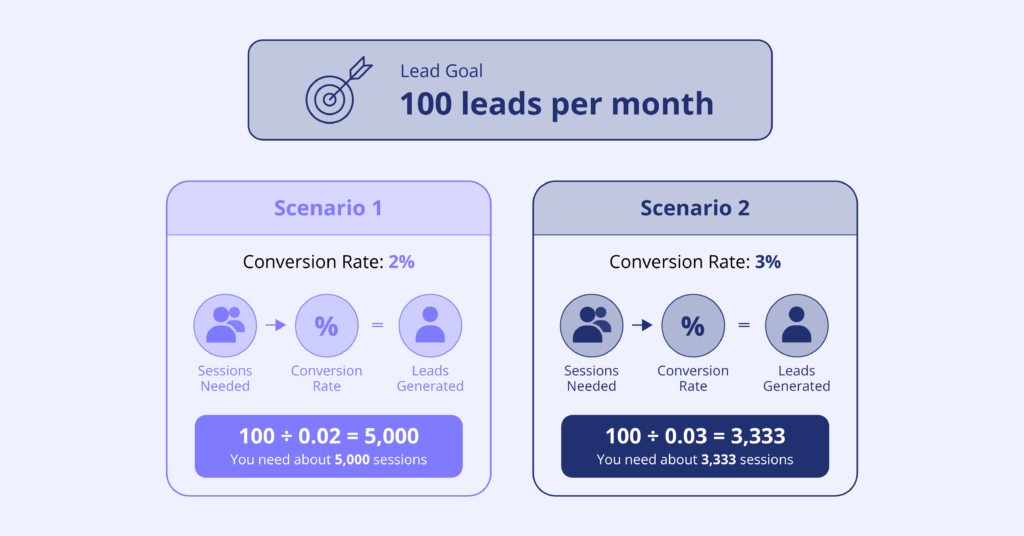
The word doing the work in that formula is “relevant.”
Strip bots, internal IPs, and single-page-view bounces under three seconds, and the denominator usually drops 20-40%. Run the calculation on filtered sessions, or the target comes out too low.
One more distortion worth knowing. Session counts inflate when returning visitors get counted as new, which happens every time cookies expire, storage clears, or someone switches devices. A site with 5,000 monthly sessions and poor returning-visitor recognition might be seeing 3,500 people, some of them three times over. That gap changes both your conversion rate and your traffic target.
Traffic and conversion performance are closely connected. More visitors help, and improving the share of useful sessions changes how much traffic you need to hit the same number.
How to Tell Whether Your Website Traffic Is Valuable
A visitor count gives you volume. Session behavior gives you context.
Users, Sessions, and Pageviews
The three metrics answer different questions. Users indicate reach, sessions show visits in a period, pageviews show depth.
One visitor creates multiple sessions. One session contains several pageviews.
The ratios matter more than the raw numbers: sessions per user tells you whether people come back, pageviews per session tells you whether they explore.
Both ratios break the same way. Poor returning-visitor recognition inflates users, deflates sessions per user, and makes a loyal audience look like a stream of strangers.
The next layer is intent. A session containing a pricing visit and a signup attempt deserves more attention than one article view, even though both count as one session.
Traffic Sources
Channel changes value more than volume does.
Two channels, 10,000 sessions each. One produces 150 leads, the other 60. Identical traffic, commercial results 2.5× apart.
Attribution decides which channel gets credit, and the default model shapes the answer. GA4 uses data-driven attribution; last-click credits the final touch. Organic often looks weaker under last-click because it does the early work and paid closes.
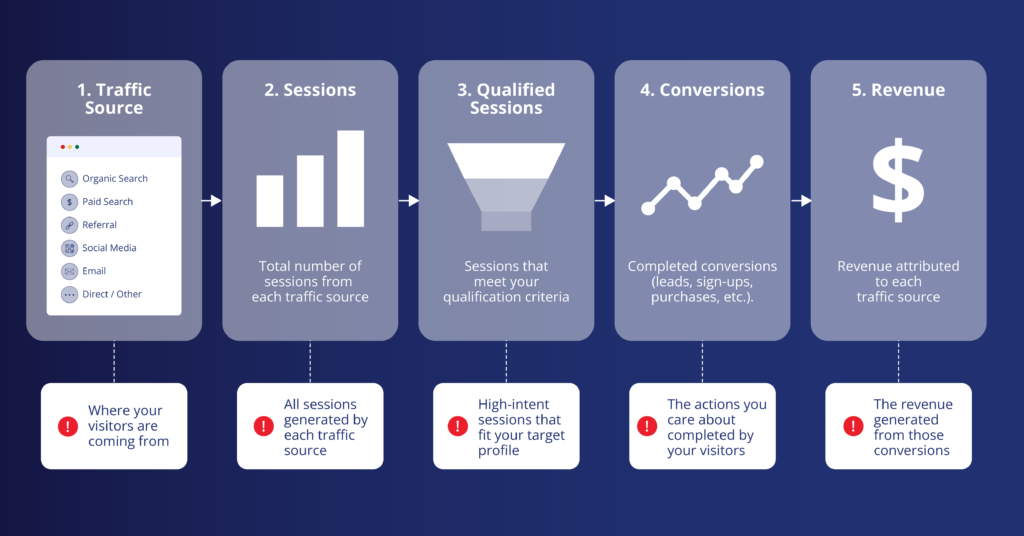
Qualified sessions is the column that earns its place. Define it once, as pricing views, demo starts, or repeat visits within 30 days, then hold that definition steady across channels.
Which Sessions Are Most Likely to Convert?
A session gets interesting when the behavior starts to resemble what preceded past conversions.
Look for Commercial Behavior
Commercial behavior depends on the business model. An ecommerce visitor moves from category to several product pages, then adds to cart. A SaaS visitor reviews features, integrations, pricing, signup. A hotel visitor checks several room options before opening the booking flow.
Single actions are weak predictors. Sequences are strong ones.
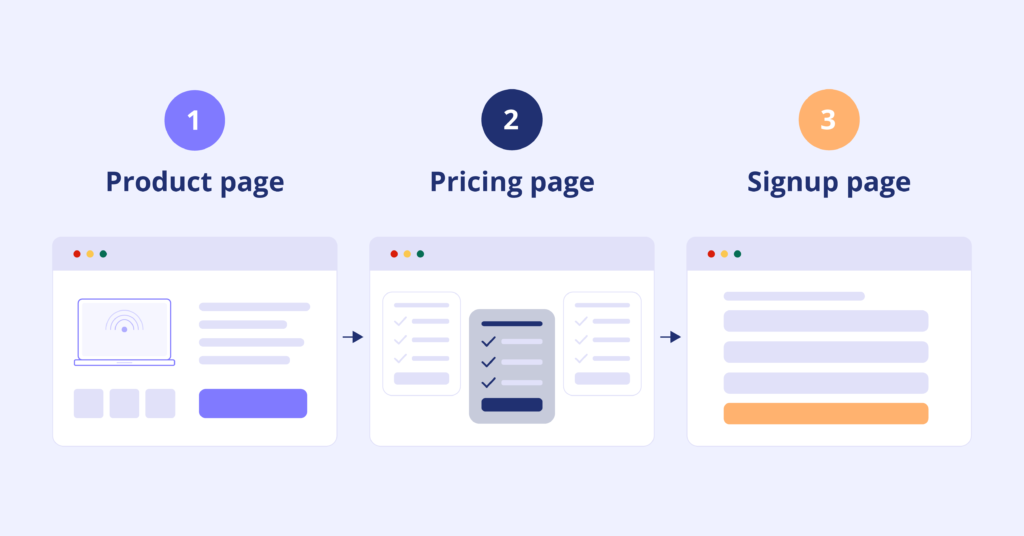
Order matters as much as membership. A visitor who reads pricing first and product features second is comparing vendors. One who reaches pricing last has already decided you might be the answer. Same three pages, two different sessions.
The logic transfers across industries. Media looks at repeated premium-content views. Booking looks at availability and itinerary activity. Ecommerce looks at comparisons and cart events.
Combine Signals
Behavior alone misses context. A useful rule combines all three layers:
Previous product interest + current pricing visit + returning visitor
The third element does the heaviest lifting. A first-time pricing view is curiosity. A third pricing view across two weeks is a decision in progress, and only cross-session recognition tells them apart.
Two things to check before shipping a rule like this:
- Validate it against sessions that already converted, since a condition that sounds right and matches 4% of your converters costs more than it returns.
- Write the response before the condition, because a rule with no clear action attached is a segment nobody uses.
How Real-Time Activation Turns Traffic Into Action
Analytics is useful for understanding what happened. Real-time activation adds a way to respond during the visit.
A visitor opens a pricing page after exploring several product pages. A configured rule evaluates the available session and visitor context. If the conditions match, the site can show an experience designed for the situation.
The response could be a banner, a chat prompt, a recommendation, a localized offer, or another configured onsite action.
Adenty processes visitor signals during the active session and supports real-time activation through configurable UI actions, signals, JavaScript actions, and API requests.
The timing matters. A marketing team could analyze the session later and use the information for a future campaign. Real-time activation gives the website a chance to react before the current visit ends.
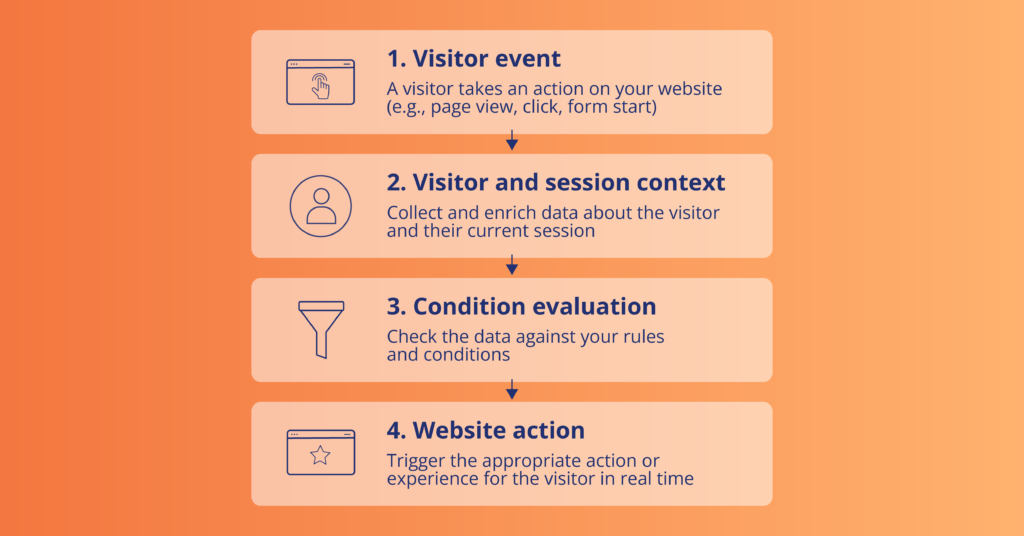
This makes the data useful beyond reporting. A developer can use visitor context in client-side logic, subscribe to signals, or connect a configured action to an external API.
The result is a workflow where the website can make a decision based on current visitor information instead of waiting for a later reporting cycle.
How Adenty Fits Into the Activation Workflow
Session activation earns its keep when visitor activity connects to the systems the business already runs.
1. Connect visitor data with your existing stack
Nothing gets replaced. Adenty sends events to Google Analytics, so GA4 stays your reporting home with more visitor signals in it. BigQuery receives collected data for analysis and modeling. Leadfeeder company data attaches to the individual behind the visit. HubSpot and Zoho CRM records pick up visitor and behavioral data.
Beyond the predefined integrations, API-based connections cover whatever else your stack includes.
2. Use visitor data during the session
Context is worth most while the visitor is still on the page.
A persistent Visitor ID carries continuity across sessions, sites, and devices. Stable storage and real-time signals give your client-side logic enough to decide whether a visitor qualifies for a configured experience.
Earlier activity changes what a current session means. A first-time visitor on a product page gets the standard experience. A recognized visitor returning after previous research qualifies for something else, and the decision draws on current activity plus the profile already built.
3. Give high-traffic pages a reason to convert
Thousands of visitors and few commercial actions is a common combination. Volume alone does not move anyone toward signup.
Look at what visitors do after they arrive. Behaviors correlating with conversion become activation conditions for the page. Someone reading an educational article may need more information. Someone reading the article, opening a product page, and checking pricing has told you something different.
Once a session crosses a defined threshold, the page responds accordingly.
4. Make low-traffic pages work harder
High traffic attracts attention, and lower-volume pages often carry stronger intent. A pricing page sees a fraction of a blog article’s visits, and each of those visits is worth more if a meaningful share progresses toward signup.
Session-level analysis finds these moments. Identify the pages and behaviors associated with conversion, then decide which of them deserve an onsite response.
How to Measure Whether Activation Improves Conversions
A real-time experience needs a business metric attached to it.
Track the Right Conversion Metrics
Conversion rate is the obvious starting point. Revenue per session can add another useful dimension for ecommerce and other transactional businesses.
You can also track:
- Eligible sessions
- Activated sessions
- Conversions after activation
- Revenue from activated sessions
- Conversion rate among activated sessions
Suppose 1,000 sessions meet your activation condition and 100 receive the experience. You can compare those visitors with an appropriate control group and see whether conversion performance changes.
Compare Activated and Non-Activated Sessions
Exposure alone does not prove an experience worked.
A stronger test compares visitors who received an experience with a comparable group who did not. Depending on the setup, teams can use controlled experiments or other comparison methods.
Adenty can calculate metrics related to conversion-rate uplift and returning-user recognition, with measurement configuration available for validation.
The important part is deciding on the success metric before launching the experience. If the objective is more completed purchases, measure purchases. If the objective is more qualified leads, measure lead conversion. Keep the test tied to the business outcome.
Turn Existing Website Traffic Into More Conversion Opportunities
Traffic tells you how many people arrive.
Conversion analysis tells you how many do what the business needs. Session activation determines what happens between those two numbers.
Everything above points to one shift in where the work happens. Reports look backward at sessions already finished. Activation acts while the visitor is still reading, still comparing, still deciding.
Adenty brings visitor recognition, behavioral signals, profile context, integrations, and real-time activation into one workflow. Enriched visitor data flows into analytics, CRM, warehouse, and API-based systems. Client-side signals drive onsite actions during the session itself.
The starting point stays simple. Look at the sessions you already receive. Identify the behaviors preceding conversion. Decide where a real-time response would change the outcome.
More traffic is one way to grow. Doing more with the traffic you have is the faster one, and the opportunity is already sitting in those sessions.
Got traffic? Let’s see what you can do with it. Book a 30-minute demo and explore the possibilities.
