
Adenty 2.3 Follow-up: Rebuilt Visitor Dashboard and ID Graph Key TTL

The first wave of 2.3 shipped two activation modules and a unified visitor profile. This follow-up turns two more screws that help teams turn more of their existing paid traffic into conversions. Reporting becomes honest about where that conversion potential actually lives. And every key inside the ID Graph gets a lifetime of its own, so identifiers no longer act like they are set in stone.
What landed in the follow-up
Two shipped items you can use today:
- A redesigned Dashboard that reports the real conversion value Adenty adds, not just raw traffic volume.
- ID Graph Key Expiration, a configurable time-to-live on every identifier type stored in the graph.
Both are available in your Adenty workspace right now. No snippet update, no re-tagging, no plan change.
Dashboard Update
The old dashboard counted events and sessions. The new one reports where your visitor base is being quietly lost, and what Adenty actually recovers. Numbers that used to live in a hand-prepared PDF now sit on the main screen, with new tiles for ad-blocker bypass, human versus bot traffic, and per-browser recognition.
Inside the rebuild
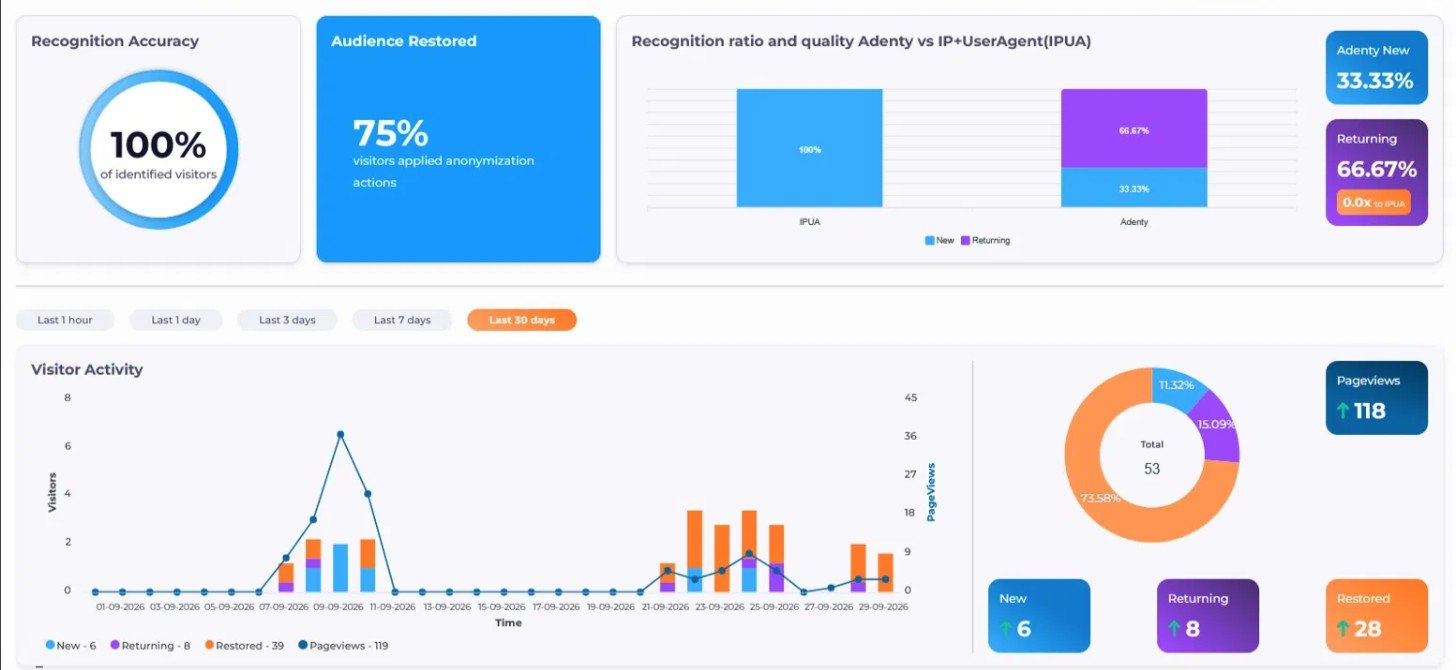
- Recognition Accuracy tile. Share of identified visitors over the chosen window, including sessions opened in incognito, behind a VPN, or in storage-cleared browsers.
- Audience Restored tile. Visitors who tried to stay anonymous and were still mapped back to a stable profile.
- Recognition ratio and quality: Adenty vs IP+UserAgent and Adenty vs cookies. Two side-by-side comparisons for new and returning cohorts, so the lift over both legacy methods is visible on one screen.
- AdBlockers bypassed. Sessions where a browser-level ad blocker is active and Adenty still captures the visit through server-side identity.
- Human vs Bot PageViews. Human traffic and bot traffic reported as separate streams, so campaign metrics do not drown in automated noise.
- Browser and device-type stats. Recognition quality by browser family (Chrome, Safari, Firefox, Edge, others) and by device type (desktop, mobile, tablet).
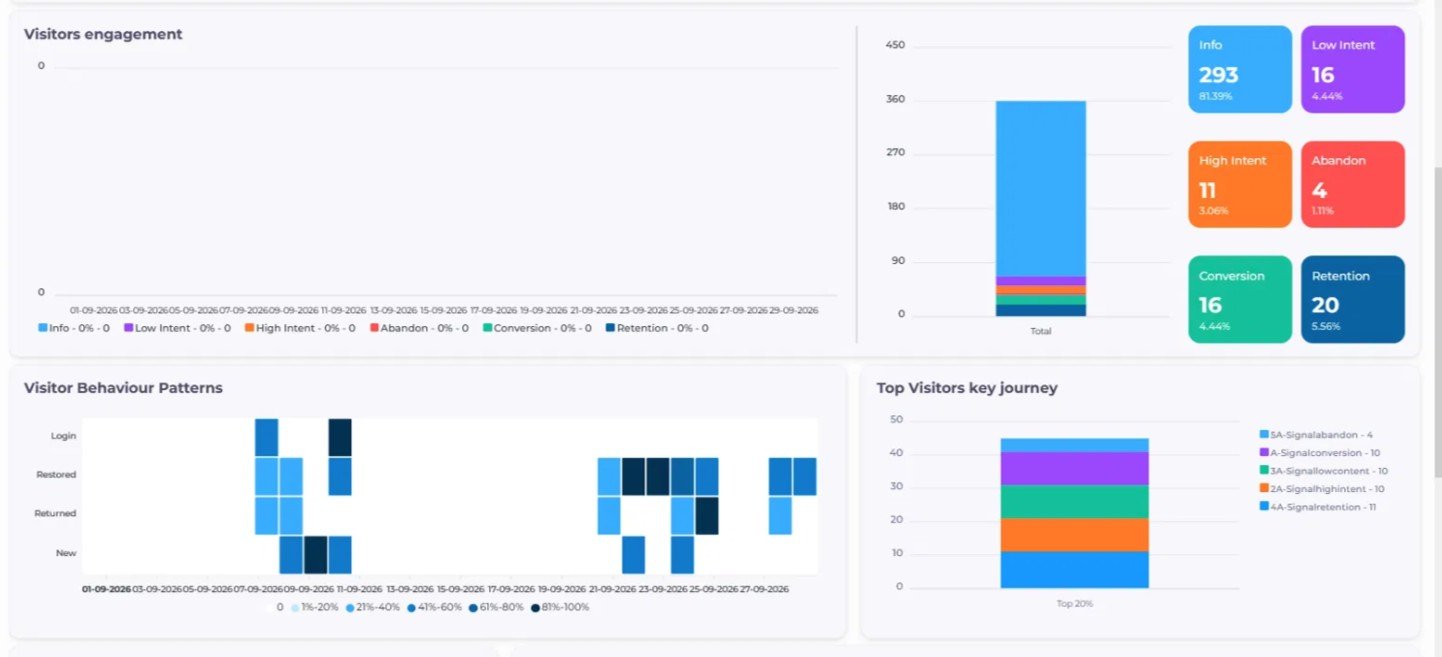
- Visitors engagement. Daily volume by intent tier: Info, Low Intent, High Intent, Abandon, Conversion, Retention. Period totals sit in the side column.
- Visitor Behaviour Patterns. A heatmap by day for New, Returned, Restored, and Login activity, so weekly rhythms become obvious at a glance.
- Top Visitors key journey. The actions the most active 20% of visitors take most often, broken out by signal type.
- Visitor Activity. New, returning, and restored visitors render as columns, with pageviews on a separate line.
Why your reporting day looks different
Most companies pay for all of their traffic and can fully use the conversion potential of only a small share. The gap between the two is where Adenty earns its keep. The new dashboard shows that gap in one place.
Three readings become possible without opening another tool. First, how continuous your visitor history looks after Adenty closes it. Second, how much engagement the restored audience actually produces, broken out by intent tier. Third, how much of your reported traffic is real people against bots and ad-blocker noise. For teams running real-time visitor tracking across several properties, the engagement signals you watch here feed the A-Creative and A-Script actions that run during the live session, so the dashboard pairs well with the Adenty Actionable CDP.
ID Graph Key Expiration
No two identifiers age at the same speed. A verified email can anchor identity for years. A home IP may belong to a different person after a router reboot. A User Agent string shifts every time a browser auto-updates. In the follow-up, you can set a time-to-live on every key type inside the ID Graph, so an identifier only ties visitors together while it is still trustworthy.
Inside the rebuild
- Every key type in the ID Graph accepts its own expiration window, counted in days.
- Stable keys such as email, hashed account ID, or an external CRM identifier can stay open or run on a long window.
- Volatile keys such as IP, User Agent, or short-lived browser cookies can run on a short window, so they only bridge sessions that fall inside that window.
- Once a key expires for a given visitor, Adenty stops using it to connect that visitor to new sessions. The historical association stays untouched.
- No snippet update needed. Expiration is set inside the ID Graph configuration and applied on the next evaluation cycle.
Why your identity graph looks different
Before this release, every key in the ID Graph lived forever. For an email, that is desirable. For an IP, it quietly creates risk. On a residential ISP pool, in a co-working space, or on any shared network, two different people can appear on the same IP inside a week. Without an expiration window, both end up linked to the same persistent ID, which overstates returning counts and leaks into audience building.
With a TTL per key, the ID Graph starts to behave the way identifiers behave in practice. Precision stays steady as the audience grows. Teams running cross-domain visitor identification or cross-device audiences get the knob they need to keep recognition conservative instead of optimistic.
Where this fits in the Adenty story
Adenty is not another visitor identification vendor. It is the layer that turns the behavior of your existing traffic into conversions you were leaving on the table. The follow-up strengthens two of the three steps in that logic:
- Recognize. A continuous visitor identity, now with ad-blocker bypass, bot filtering, and per-browser recognition reported in the open.
- Understand. Persistent behavioral knowledge, now with a stricter ID Graph that does not inflate what you know about a visitor.
- Convert. Timely AI-driven engagement, already live through A-Creative and A-Script from the first wave of 2.3.
If you want a wider view of how this compares to classic analytics, our team keeps a running list of the top website visitor tracking tools and how each one handles anonymous visitor tracking. The follow-up narrows the gap on both the measurement and the identity side.
Try it on your site
Full technical release notes sit inside the Adenty workspace. You can also start a 14-day Adenty trial or book a 15-minute walkthrough so our team can map the new dashboard and the ID Graph controls to the visitor data you already collect.
Two surfaces update. The main dashboard switches to a value-first layout with new tiles for ad-blocker bypass, Human vs Bot PageViews, and recognition quality by browser and device type. The ID Graph settings grow a lifetime field for each key type. Nothing on your site snippet changes.
Classic analytics reports what happened on the site. The new Adenty dashboard reports how much of your existing paid traffic you are actually converting against how much you could be. It shows the lift over IP plus User Agent, the lift over cookies, the ad-blocker share Adenty still recovers, and the real human-versus-bot split in your traffic.
It splits reported pageviews between real humans and automated traffic. Bot traffic inflates vanity metrics and distorts conversion rate math, since bots almost never buy. A clean split lets marketing teams compare campaigns on human traffic alone, which is the traffic that drives revenue.
Sessions where the visitor has a browser-level ad blocker on, and the usual third-party tracking fails, but Adenty still captures the visit through server-side identity. The tile shows the share of recoverable traffic a cookie-first setup would have missed entirely.
Match the window to how stable the identifier is. Email, hashed account ID, and external CRM IDs usually stay open or sit on a long window. IP, User Agent, and short-lived browser cookies belong on a short window, so a stale value does not quietly link two different people under one profile.
