
Optimizing User Signals: Your Complete Guide to Better Rankings

SEO gets the visitor in. Nothing about a ranking tells you what happened next.
Someone reads your article, opens three internal links, comes back Thursday, compares two product pages, and leaves. Your analytics logs all of it as four unrelated visits by four strangers.
The term “user signals” needs precision too.
Google runs many ranking systems and signals, including relevance, content quality, and page experience. Your analytics reports behavioral data: engagement, return visits, content interactions, conversions. The two overlap in subject matter, and a metric showing up in GA4 does not become a Google ranking factor by appearing there.
Useful work happens across both. Improve what people get when they arrive from Search, measure the behavior that means something, connect the repeat activity, and let those signals drive your website decisions.
Here’s how to tell the two apart, and what to do with each.
What Are User Signals in SEO?
User signals is a broad SEO term for how people interact with search results and websites. Worth setting expectations early: Google does not publish a fixed list of user signals with individual ranking weights. Its ranking systems weigh many factors when deciding which pages best match a query.
Two categories are worth separating, because they answer to different owners.
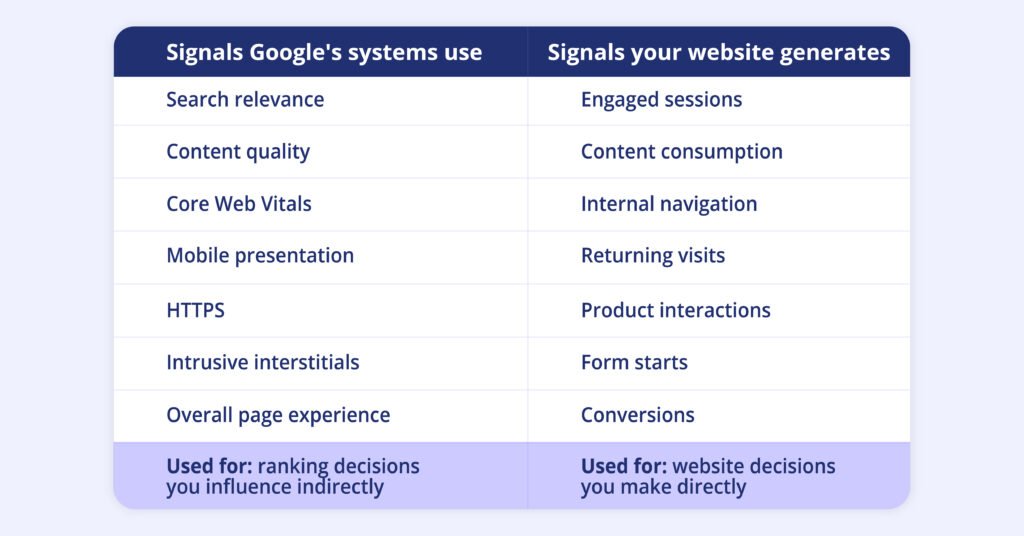
SEO gets the visitor in. Nothing about a ranking tells you what happened next.
Someone reads your article, opens three internal links, comes back Thursday, compares two product pages, and leaves. Your analytics logs all of it as four unrelated visits by four strangers.
The term “user signals” needs precision too.
Google runs many ranking systems and signals, including relevance, content quality, and page experience. Your analytics reports behavioral data: engagement, return visits, content interactions, conversions. The two overlap in subject matter, and a metric showing up in GA4 does not become a Google ranking factor by appearing there.
Useful work happens across both. Improve what people get when they arrive from Search, measure the behavior that means something, connect the repeat activity, and let those signals drive your website decisions.
Here’s how to tell the two apart, and what to do with each.
Which User Signals Can You Actually Improve?
SEO teams can directly improve four things: how well a page matches search intent, how easy the content is to use, how the page performs technically, and how clearly it points visitors to a next step. Rankings themselves are an output. These four are the inputs you control.
Search intent
A page should answer the need behind the query. Someone looking for a technical implementation guide expects different content from someone comparing pricing. Check the query before checking engagement metrics: what did the visitor expect to find, does the page address it above the fold, and does the depth fit their research stage?
Content experience
Visitors should reach the main answer, supporting detail, examples, and next actions without wading through unrelated sections. Google’s Search Essentials recommends people-first content in the language people search with.
Page experience
Loading performance, responsiveness, visual stability, mobile presentation, security, and intrusive elements. Google recommends treating these as one overall experience, not one metric as a ranking shortcut.
Next steps and engagement
A visitor who moves from an organic article to a product page shows different intent from someone who leaves after a paragraph. A returning visitor working through several related resources is another signal worth reading, this time for your own analysis rather than Google’s.
Of the four above, page experience is the one with published thresholds you can measure against. Start there.
Core Web Vitals: The Technical Signals Worth Fixing
Core Web Vitals give SEO and engineering teams three concrete measurements for page experience, each with a threshold Google treats as good:
- LCP (Largest Contentful Paint) measures loading performance. Target 2.5 seconds or less.
- INP (Interaction to Next Paint) measures responsiveness. Target under 200 milliseconds.
- CLS (Cumulative Layout Shift) measures visual stability. Target under 0.1.
Most sites miss at least one. The recent Chrome UX Report covered 18.4 million origins, and 55.7% passed all three, which leaves technical SEO plenty to work on.
A practical workflow for an SEO team:
- Open the Core Web Vitals report in Search Console.
- Identify templates with weak results.
- Trace the technical cause behind each one.
- Prioritize pages carrying substantial organic traffic.
- Re-test after deployment.
Performance matters at the implementation level too. Adenty’s tracking runs asynchronously, uses caching, and controls resource loading, so visitor tracking stays off the critical path.
Search Intent Comes Before Engagement
A page can load in under a second and still fail the person who arrived from Google.
Take a search for “B2B visitor identification software.” The visitor lands on a generic homepage, reads broad company messaging, and leaves because nothing on the page speaks to the commercial need behind the query.
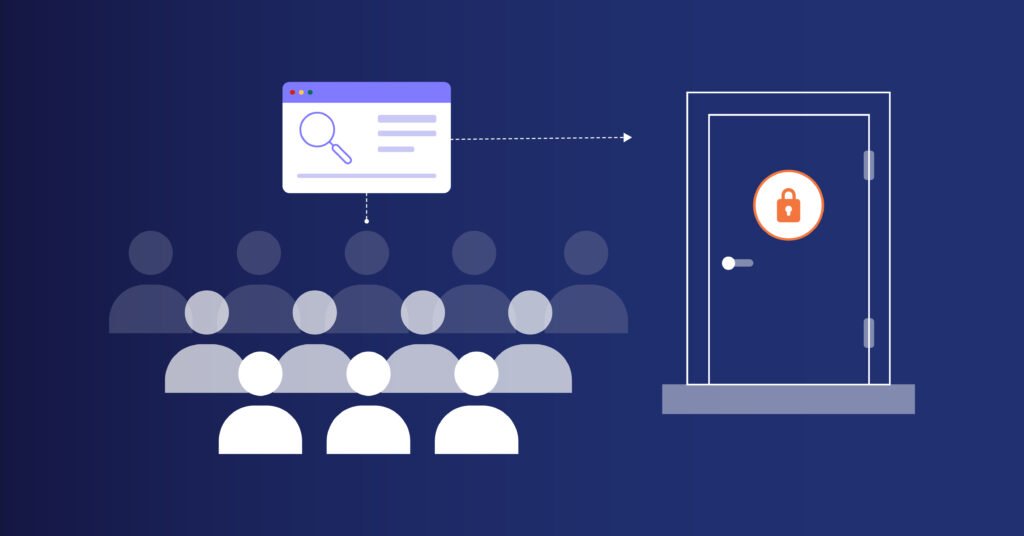
Intent gives you a better starting point:
- Informational queries call for educational content.
- Commercial investigation queries need comparisons, capabilities, pricing, use cases, or customer evidence.
- Transactional queries need a direct path to conversion.
- Navigational queries need a clear route to the brand, product, or resource named.
Review the query and the landing page side by side.
Does the headline match the search? Does the page answer the main need above the fold? Is there enough detail for the visitor’s stage?
Strong engagement metrics can coexist with irrelevant organic traffic.
Sort out relevance first, then optimize toward a dashboard number.
How to Measure What Happens After the Search Click
Measuring post-click behavior takes two data sources working together: Search Console for how visitors found you, and first-party website analytics for what they did next.
Search Console stops at the click. Analytics picks up from the landing page and tracks engagement, return visits, and conversions. Connecting the two shows which queries bring visitors who stay, come back, and convert.
Search Console covers the first half of the journey:
- Impressions
- Clicks
- CTR
- Average position
- Search queries
- Landing pages
First-party behavior covers the second half:
Search query → landing page → behavior → returning visit → conversion
That wider view shows which organic landing pages lead to deeper exploration, which topics bring people back, and which pages contribute to conversions. The metrics worth watching:
- Engaged sessions
- Content interactions
- Internal navigation
- Product exploration
- Form starts
- Conversions
- Returning visitors
Google Analytics can stitch sessions together when the identity information exists. Google describes User-ID as a way to connect behavior across sessions and devices for users assigned a persistent ID.
Adenty adds a layer on top (you can double-check it in our FAQ).
It recognizes returning visitors and connects activity across sessions, sites, and supported devices, and it can send visitor events into Google Analytics, so teams keep GA4 for familiar reporting and gain extra visitor context.
Why One Visitor Can Look Like Several Visitors
One buying journey, five visits:
Monday comparison article → Thursday product page → next week pricing → later technical docs → finally converts
Session-based reporting shows five strangers. Adenty shows one person moving through evaluation, and by the pricing visit, your team can see the comparison article and product page already behind them.
That continuity comes from identity resolution, the same principle behind enterprise customer data systems. Adobe describes an identity graph as a map of relationships between identities, letting separate interactions build one customer profile.
Adenty applies the logic to web sessions specifically.
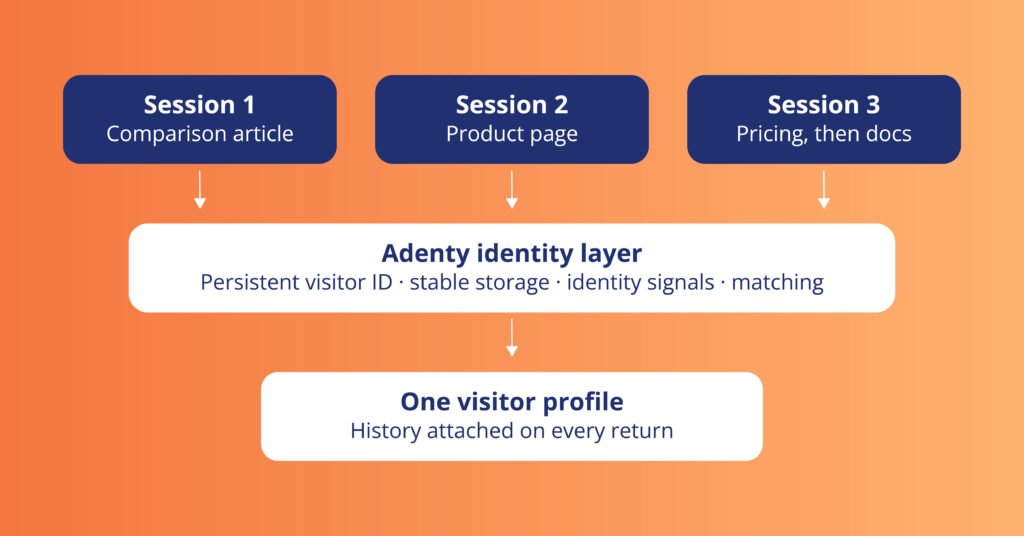
The purpose is continuity. Related activity can contribute to one visitor profile, giving teams more context for analysis and website actions.
How Identity Resolution Turns Behavioral Data Into User Signals
Behavioral data becomes a user signal when you know it belongs to a returning visitor. That’s the whole difference between the two models below.
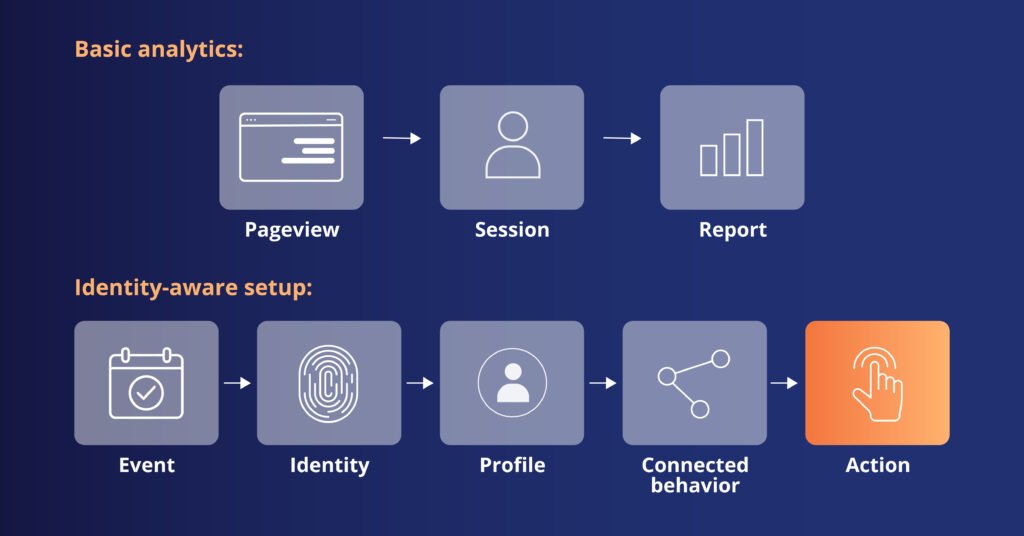
The second model adds context. A visitor profile holds previous sessions, visitor status, device and geographic attributes, behavioral events, and data from connected sources, so the same pageview arrives with a history around it.
Adenty processes event signals and session interactions in real time, combines them with identity data and connected sources, and can push the enriched signals to analytics platforms, CDPs, BigQuery, APIs, and other destinations.
For SEO teams, the split is clean. Search Console shows how someone found the page. Analytics shows what they did once there. Identity resolution connects the visits, which is what matters when research runs across a week rather than a session.
What Can You Do With User Signals on Your Website?
A signal earns its place when a website can respond to it. That last step in the chain above, the action, is where the profile stops being a report and starts changing what the visitor sees.
Three common cases:
Returning visitors. Someone has already read several resources on one product area. On the next visit, that history becomes context for recommendations or other configured experiences.
Repeated pricing visits. Someone checks pricing three times after working through product content. Adenty can read the signal in real time and fire a configured action: LiveChat, a banner, recommendations, localized pricing, or custom JavaScript.
Content interests. Someone keeps returning to one subject area. That activity feeds recommendations and segmentation.
The chain in each case:
Signal → context → website response
A pageview in a report tells your team something. A signal wired to a response gives them something to test.
Real-Time Activation: Acting Before the Session Ends
Traditional analytics often follows this sequence:
Visit → event recorded → report → analysis → action
Real-time activation collapses that path. A visitor opens pricing after working through several product pages, a configured rule recognizes the combination, and the site responds inside the same session.
The technical setup connects three parts: the visitor profile, the behavioral condition, and the action triggered when the condition is met. This lets teams define rules around combinations of signals, rather than reacting to individual pageviews in isolation.
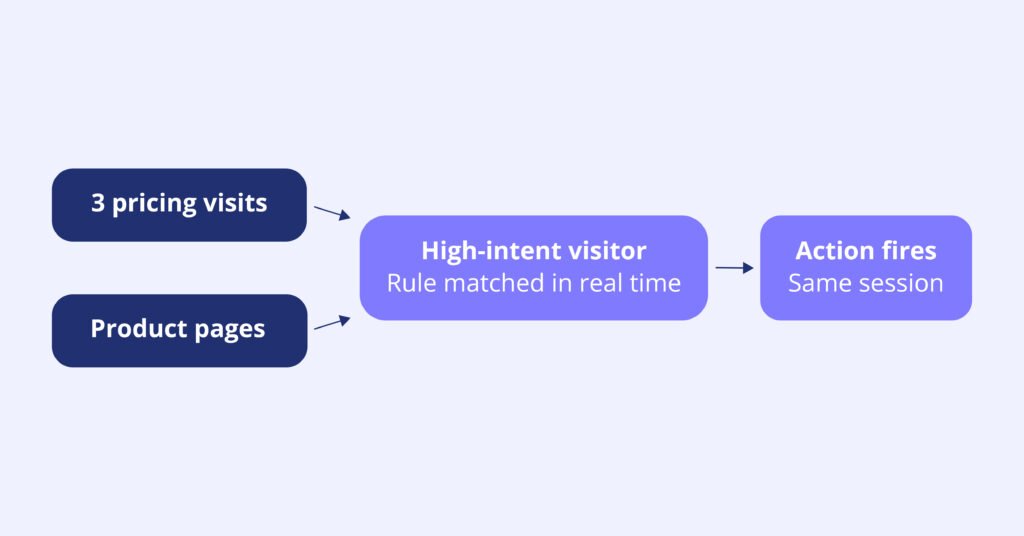
Adenty’s Identity Resolution layer processes these signals during the session, so the response can happen while the visitor is still active on the site.
What User Signal Optimization Can Do for Conversion
User signal optimization can affect outcomes after visitors reach the website. Adenty’s customer cases provide concrete examples.
SaaS
A SaaS company used Adenty to connect visitor behavior with personalized website experiences, helping guide visitors toward relevant solutions and content.
The results were hard to miss. The company reported:
- 45% increase in website conversions
- 33% more traffic to recommended solution pages and case studies
- 42% deeper visitor profiles
- 20% longer average time on site
- 120 new users acquired through the website
Media
A US media group with more than 100 local newspapers and digital magazines used Adenty to identify returning readers and activate personalized engagement scenarios.
Three months after implementation, the numbers were jaw-opening:
- 200% increase in engaged readers
- 2.6× longer visitor recognition
- 15% publishing revenue growth
Ecommerce
A US-based ecommerce group operating four natural cosmetics and food supplement brands wanted to reduce cart abandonment across four websites, where rates had reached 75% to 80%.
Within three months, the company reported:
- 13% reduction in cart abandonment
- Up to $2M in recovered revenue
- 3× more effective returning-user recognition than cookie-based tools
These figures describe customer outcomes from visitor recognition, behavioral analysis, and activation. They are not evidence of direct Google ranking gains. The SEO connection sits earlier in the process, where organic traffic becomes measurable visitor activity, and website experience becomes easier to evaluate.
A Practical User Signal Optimization Framework
Use the following workflow to turn user signals into concrete SEO and website decisions.
Step 1. Check search intent
- Review high-impression queries.
- Identify pages attracting irrelevant traffic.
- Match landing pages to the query intent.
- Check whether the content fits the visitor’s research stage.
Step 2. Check page experience
- Review LCP.
- Review INP.
- Review CLS.
- Test mobile presentation.
- Check intrusive elements.
Step 3. Check behavior
- Track meaningful interactions.
- Review content consumption.
- Monitor internal navigation.
- Measure product exploration.
- Compare form starts and conversions.
Step 4. Check returning traffic
- Measure returning visitors.
- Check whether repeat sessions can be connected.
- Compare new and returning visitor behavior.
- Review which pages bring visitors back.
Step 5. Define meaningful signals
Useful examples include:
- Repeated pricing visits
- Multiple product page visits
- Return visits after technical content
- Repeated engagement with one topic
- Movement from educational content to commercial pages
Step 6. Decide what happens next
For each important signal, define:
Signal → condition → action → outcome
For example:
Repeated pricing visits → high-intent behavior → relevant sales interaction → conversion
This keeps the process tied to something measurable.
Where Adenty Fits in the SEO Stack
Adenty fits after acquisition and alongside existing analytics infrastructure.
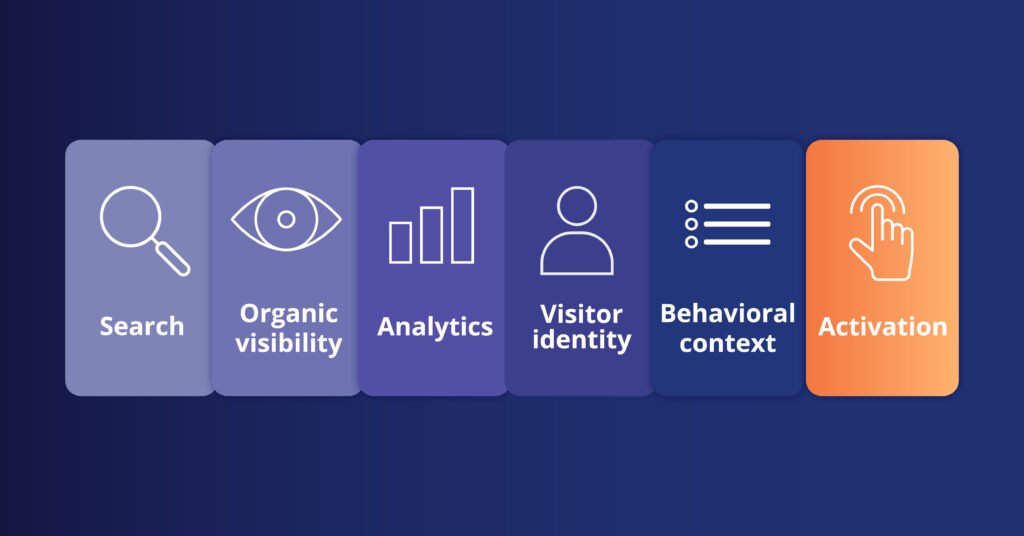
Google helps people find the website. Analytics platforms provide traffic and interaction reporting.
Adenty adds visitor recognition, behavioral continuity, profile enrichment, and real-time activation.
For SEO teams the job is narrow: connect visitor activity, add context to repeat behavior, and make the signals available for analysis or activation. If you have any questions, the Adenty team is one call away to clarify all the details.
The vendor-reported caveat is now carried by “its own figures” rather than a standalone sentence, which keeps the disclosure without spending three lines on it.
Optimize What Happens After the Click
Better rankings bring more people to your site. User signals tell you what happens after they land.
SEO measures visibility. Analytics measures activity. Identity resolution connects that activity across sessions. Activation lets you respond to it mid-visit.
Adenty handles the latest stages with confidence by recognizing visitors, connecting sessions, enriching profiles, and firing relevant experiences on the spot. For a SEO team, post-click analysis turns into something you can act on. Less “how much traffic,” more who came back and what moved them.
Want to see what’s happening behind your organic traffic? Try Adenty for free and see how it fits your stack.
